Understanding Microsoft Entra ID Governance: A Complete Guide
In today’s hybrid work environment, organizations face unprecedented challenges in managing identity and access across cloud and on-premises resources. With users, partners, and contractors requiring different levels of access at different times, maintaining security while ensuring productivity is no longer optional—it’s essential.
Microsoft Entra ID Governance provides a comprehensive identity governance solution that helps organizations answer four critical questions:
- Which identities should have access to which resources?
- What are those identities doing with that access?
- Are there organizational controls in place for managing access?
- Can auditors verify that the controls are working effectively?
This guide explores the core pillars of Entra ID Governance and shows you how to implement a modern identity governance strategy.
The Four Pillars of Identity Governance
Microsoft Entra ID Governance is built on a comprehensive framework addressing identity governance at enterprise scale. Here’s the architectural overview:
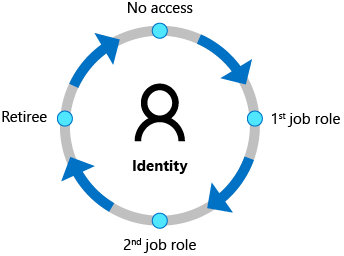
Identity Lifecycle
The foundation of governance: automate provisioning and deprovisioning across the employee journey.
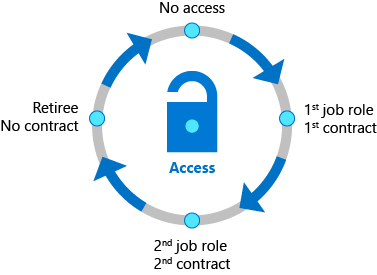
Access Lifecycle
Manage access throughout its lifecycle: from initial provisioning through continuous reviews to revocation.
Key Capabilities
1. Identity Lifecycle Governance
The Challenge: Identity lifecycle management is the foundation for effective governance. Organizations need to automate the provisioning of new identities while ensuring timely deprovisioning when employees leave.
Key Capabilities:
- Automated identity provisioning from HR systems — Integrate with Workday, SuccessFactors, or other HR platforms to automatically create and update identities in Microsoft Entra ID and on-premises Active Directory
- Lifecycle Workflows — Automate key lifecycle events such as:
- Joiner workflows (pre-boarding and onboarding)
- Mover workflows (internal transitions and role changes)
- Leaver workflows (immediate and delayed deprovisioning)
- Entitlement Management — Enable self-service access requests and approvals with time-limited assignments
- Automatic Assignment Policies — Update group memberships, application roles, and SharePoint permissions based on user attribute changes
Real-world Example: A new employee’s first day can now be fully automated:
- Email with temporary access pass sent to manager
- Welcome email sent to employee
- Automatic group memberships added based on department
- Application licenses assigned
- Equipment provisioning triggered
2. Access Lifecycle Management
The Challenge: Initial access provisioning is just the beginning. Over time, employees change roles, move between departments, or transition to different responsibilities. Managing this changing landscape manually leads to access creep—users retaining access they no longer need.
Key Capabilities:
- Access Reviews — Regularly audit and recertify who has access to:
- Cloud applications and SaaS platforms
- Microsoft 365 Groups and Teams
- On-premises applications
- Privileged roles and Azure resources
With AI-powered recommendations based on:
- Last sign-in history
- Usage patterns
- Peer group analysis
- Delegated Access Management — Empower business owners to:
- Approve or deny access requests
- Make informed decisions about continued access
- Manage their team’s access without IT involvement
- Conditional Access Integration — Enforce adaptive policies like:
- IP address restrictions
- Device compliance requirements
- Multi-factor authentication challenges
- Terms of Use acceptance
- Access Package Automation — Bundle resources (groups, apps, SharePoint sites) with approval workflows and automatic expiration
Impact: Organizations typically see 30-50% reduction in unnecessary access through regular access reviews.
3. Privileged Access Management
The Challenge: Privileged roles carry the highest risk. A compromised admin account can lead to organizational breach. Yet many organizations struggle to manage who has administrative access and when.
Key Capabilities:
- Just-In-Time (JIT) Access — Grant temporary elevated access only when needed:
- Request approval from designated approvers
- Automatic expiration after defined period
- Complete audit trail of all privileged actions
- Role-Based Access Control (RBAC) — Implement least-privilege through:
- Microsoft Entra directory roles
- Azure resource roles
- Microsoft 365 roles
- Custom organizational roles
- Privileged Identity Management (PIM) — Govern privileged access with:
- Risk-based policies
- Time-bound role assignments
- Recurring access reviews for admins
- Real-time alerts for suspicious activities
- Workload Identity Governance — Secure service-to-service communication by:
- Managing application and service principal access
- Implementing workload identity federation
- Detecting compromised workload identities
4. Agent Identity Governance (Emerging)
The Challenge: AI agents and autonomous systems introduce a new type of identity that requires governance. Unlike human users, agents operate 24/7 and may make autonomous decisions affecting organizational data.
Key Capabilities:
- Sponsor Accountability — Every agent must have a human sponsor responsible for:
- Agent purpose and lifecycle decisions
- Access reviews and approvals
- Continuous oversight
- Agent Identity Blueprints — Create templates that:
- Apply Conditional Access rules to all agents of a type
- Enforce permissions policies
- Enable mass governance operations (disable/revoke permissions for entire agent classes)
- Access Package Integration — Govern agent access using the same tools as human identities, with:
- Time-bound, auditable access
- Approval workflows
- Expiration notifications
Entitlement Management: Self-Service Access with Control
Entitlement Management provides business-friendly access request workflows while maintaining IT control.
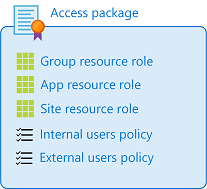
How It Works:
User Requests Access → Approval Workflow → Automatic Resource Assignment → Time-Limited Access → Expiration & Review → Auto-Removal
Real Scenario: A marketing employee needs temporary access to sales data for a project:
- Employee finds “Sales Project Access” package in the access catalog
- Submits request with business justification
- Sales manager (approver) reviews and approves
- Employee automatically added to sales group and given app access
- Access is time-limited (e.g., 90 days)
- Manager receives expiration notification
- Access automatically removed after expiration (or renewed if still needed)
Organization Benefits:
- Reduced IT ticket volume for access requests
- Business ownership of access decisions
- Transparent audit trail
- Automatic compliance enforcement
Access Reviews: Continuous Compliance
Access reviews provide the mechanism to verify that access remains appropriate over time.
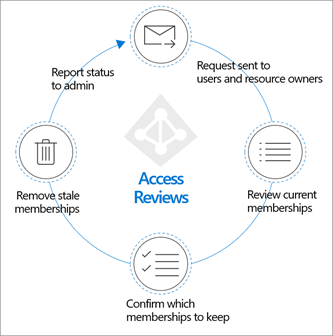
Review Types:
- Group reviews — Who should still be in this security group?
- Application reviews — Who should still have access to this SaaS app?
- Role reviews — Who should still have this privileged role?
- Access package reviews — Who should still have this bundle of resources?
- Guest reviews — Should this external partner still have access?
Review Mechanics:
- Schedule — Monthly, quarterly, or annually based on risk level
- Notify — Managers/owners receive review notifications
- Recommend — AI recommends decisions based on:
- Last sign-in data
- Usage patterns
- Peer group analysis
- Decide — Reviewers approve/deny continued access
- Automate — Decisions automatically applied (access removed or retained)
- Report — Generate compliance reports for auditors
Measurement: Organizations report 40-60% of reviewed access is either removed or modified, indicating significant access drift over time.
Lifecycle Workflows: Complete Automation
Lifecycle workflows orchestrate multi-step processes triggered by lifecycle events.
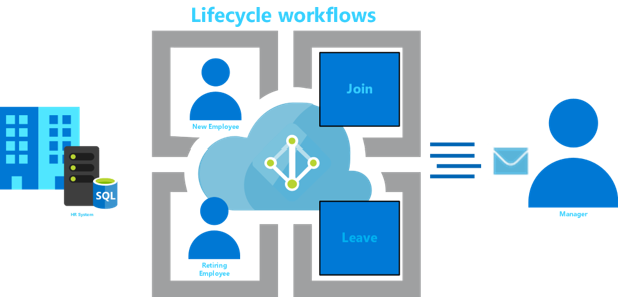
Workflow Example: New Employee Onboarding
Trigger: New user created with employeeHireDate 7 days in future

Day -7:
  → Send manager welcome email with onboarding checklist
  → Submit equipment request to procurement
  → Trigger Azure Automation to prepare workspaces

Day 0 (Hire Date):
  → Enable user account
  → Add to company-wide groups
  → Send welcome email to employee
  → Add to department-specific groups
  → Assign application licenses
  → Send manager notification of completion

Day +7:
  → Send manager follow-up to check onboarding completion
  → If not complete, escalate to HR
Extension via Logic Apps: Lifecycle workflows can integrate with Azure Logic Apps for advanced scenarios:
- Custom integrations with third-party HR systems
- Webhook calls to equipment provisioning systems
- Conditional routing based on complex business logic
- Integration with ServiceNow, Jira, or other ITSM platforms
Licensing and Scalability
Microsoft Entra ID Governance pricing:
- Free tier features — Basic identity and access management
- Premium tier — $3 per workload identity/month (or included in Microsoft Entra Suite)
- Scalable — No per-user licensing for governance features; one license unlocks all capabilities
Typical Organization Example:
- 500 employees
- 50 service principals
- 10 external partners
Cost: Approximately $180/month for comprehensive governance
What’s Included:
- Unlimited lifecycle workflows
- Unlimited access reviews
- Unlimited entitlement management
- Privileged Identity Management
- Identity Protection
- Workload Identity governance
Security and Compliance Benefits
1. Zero Trust Implementation
- Verify every identity (human and machine)
- Validate every access request
- Monitor continuous compliance
- Ensure least-privilege access
2. Regulatory Compliance
- SOC 2 Type II — Demonstrate access controls through audit logs
- HIPAA — Access reviews prove workforce authorization
- PCI DSS — Privileged access management meets requirement 7
- SOX — Access controls and separation of duties
- GDPR/CCPA — Automated data subject access request workflows
3. Threat Prevention
- Detect suspicious access patterns through AI analysis
- Immediate revocation of compromised identities
- Prevent insider threats through continuous monitoring
- Reduce attack surface by removing unused access
Implementation Roadmap
Phase 1: Foundation (Month 1-2)
- Enable Managed Identities for Azure resources
- Configure basic lifecycle workflows for joiners
- Set up initial access reviews for critical resources
Phase 2: Scale (Month 3-4)
- Implement entitlement management for self-service requests
- Deploy recurring access reviews for all applications
- Configure Conditional Access policies
Phase 3: Optimization (Month 5-6)
- Implement privileged access management
- Deploy advanced access reviews with AI recommendations
- Integrate with HR systems for automated provisioning
Phase 4: Intelligence (Month 6+)
- Implement identity analytics and reporting
- Configure risk-based policies
- Integrate Logic Apps for advanced workflows
- Leverage Copilot for workflow design
Key Metrics & Outcomes
- 75% reduction in onboarding time (Joiner automation)
- 30-50% reduction in unnecessary access through reviews
- 40-60% of reviewed access is removed or modified
- 50% reduction in security incidents from review findings
- 100% audit coverage with automated trails
- 0 orphaned accounts (automatic deprovisioning)
Getting Started
Prerequisites:
- Microsoft Entra ID subscription (P1 minimum)
- Microsoft Entra ID Governance or Suite license
- HR system integration setup (optional but recommended)
First Steps:
- Visit the Microsoft Entra admin center
- Navigate to Governance dashboard
- Start with a pilot access review (non-critical resource)
- Gradually expand to lifecycle workflows and entitlement management
- Integrate with your HR system for full automation
Resources:
- Microsoft Entra ID Governance Documentation
- Lifecycle Workflows Tutorial
- Entitlement Management Guide
- Access Reviews Best Practices
Conclusion: Modern Identity Governance is Non-Negotiable
Microsoft Entra ID Governance transforms identity and access management from a reactive security headache into a proactive, automated governance engine. By implementing comprehensive lifecycle workflows, access reviews, entitlement management, and privileged access controls, organizations can:
✅ Accelerate employee productivity (day-one enablement)
✅ Reduce security risks (continuous compliance)
✅ Simplify operations (automation)
✅ Meet regulatory requirements (audit trails)
✅ Scale governance efficiently (templated processes)
The shift from manual access management to intelligent, identity-centric governance isn’t just a technical upgrade—it’s a fundamental evolution in how organizations secure their digital future.
Learn More
- Microsoft Entra ID Governance Home
- Identity Governance Overview
- What are Lifecycle Workflows?
- Entitlement Management Overview
- Access Reviews Guide
- Microsoft Entra Agent ID for AI Governance