Securing the Cloud - A Deep Dive into Microsoft Entra Workload Identities
Securing the Cloud: A Deep Dive into Microsoft Entra Workload Identities
In the modern cloud landscape, securing service-to-service communication is paramount. Relying solely on traditional credentials is no longer sufficient. Microsoft Entra ID is providing a robust framework through Workload Identities, offering a powerful alternative for managing access and ensuring that applications and services can securely interact with each other without exposing sensitive secrets.
What Are Workload Identities?
A workload identity is an identity you assign to a software workload (such as an application, service, script, or container) to authenticate and access other services and resources. In Microsoft Entra, workload identities include:
- Applications: Abstract entities defined by their application object—the global representation of your application for use across all tenants
- Service Principals: The local representation, or application instance, of a global application object in a specific tenant
- Managed Identities: Special service principals that eliminate the need for developers to manage credentials
Understanding the Identity Hierarchy
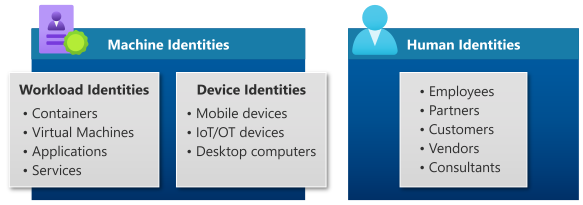
Unlike human identities that typically access a broad range of resources with a single identity, software workloads often deal with multiple credentials to access different resources. Understanding how workload identities fit into the broader identity ecosystem is crucial.
Identity Types Overview
Source: Microsoft Entra Workload ID - Official Documentation
The diagram above illustrates how workload identities (representing software workloads) fit alongside device identities to form machine/non-human identities, distinct from human identities (employees, external users, customers, etc.). This categorization is important for implementing proper security policies across your organization.
The Security Challenge
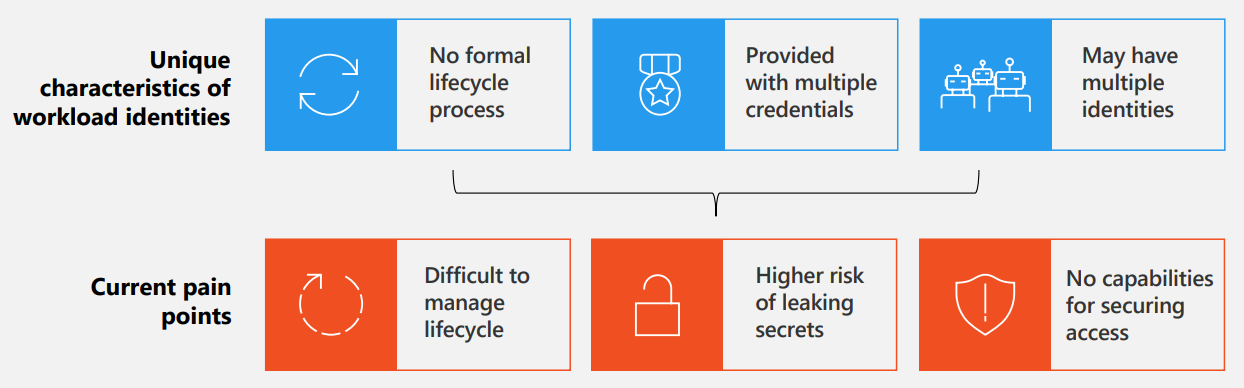
The complexity of managing multiple credentials—combined with difficulties in tracking when identities are created or when they should be revoked—creates significant security challenges. Here are the key pain points organizations face:
Workload Identity Security Pain Points
Source: Microsoft Entra Workload ID - Official Documentation
Key Pain Points in Workload Identity Security:
- 🔓 Multiple credentials stored and managed insecurely
- 👁️ Lack of visibility into workload identity lifecycle
- 🎯 Difficulty tracking and auditing access patterns
- ⚠️ Increased risk of credential compromise
- 🚨 Limited ability to detect and respond to breaches
These challenges highlight why traditional credential management approaches are inadequate for modern cloud security.
Core Capabilities: Taking Control
Microsoft Entra Workload ID provides comprehensive control over workload identities across both Free and Premium tiers:
Authentication & Authorization
- ✅ Create, read, update, and delete workload identities — Establish and manage identities to secure service-to-service access
- ✅ Token-based resource access — Use Microsoft Entra ID to authenticate and authorize workload identities accessing protected resources
Visibility & Governance
- ✅ Sign-in activity monitoring — Track workload identity sign-in events and maintain complete audit trails
- ✅ Managed identities — Use Microsoft Entra identities in Azure without handling credentials
- ✅ Workload identity federation — Enable external workloads from tested identity providers to access Microsoft Entra protected resources
Advanced Features (Premium Tier)
Identity Protection for Workload Identities:
- Detect and remediate compromised workload identities in real-time
- Identify leaked credentials and contain threats immediately
- Reduce attack surface with proactive risk analysis
Access Reviews:
- Monitor service principals with privileged roles
- Enforce the principle of least privilege through regular reviews
- Demonstrate compliance and governance to stakeholders
Conditional Access Policies:
- Define precise conditions for workload access (IP ranges, device compliance, etc.)
- Apply adaptive policies based on risk signals
- Enable real-time continuous access evaluation
App Health Recommendations:
- Identify unused or inactive workload identities
- Detect high-risk identity configurations
- Receive remediation guidelines automatically
Monitoring and Insights
Real-Time Intelligence Dashboard
Source: Microsoft Entra Workload ID FAQs - Official Documentation
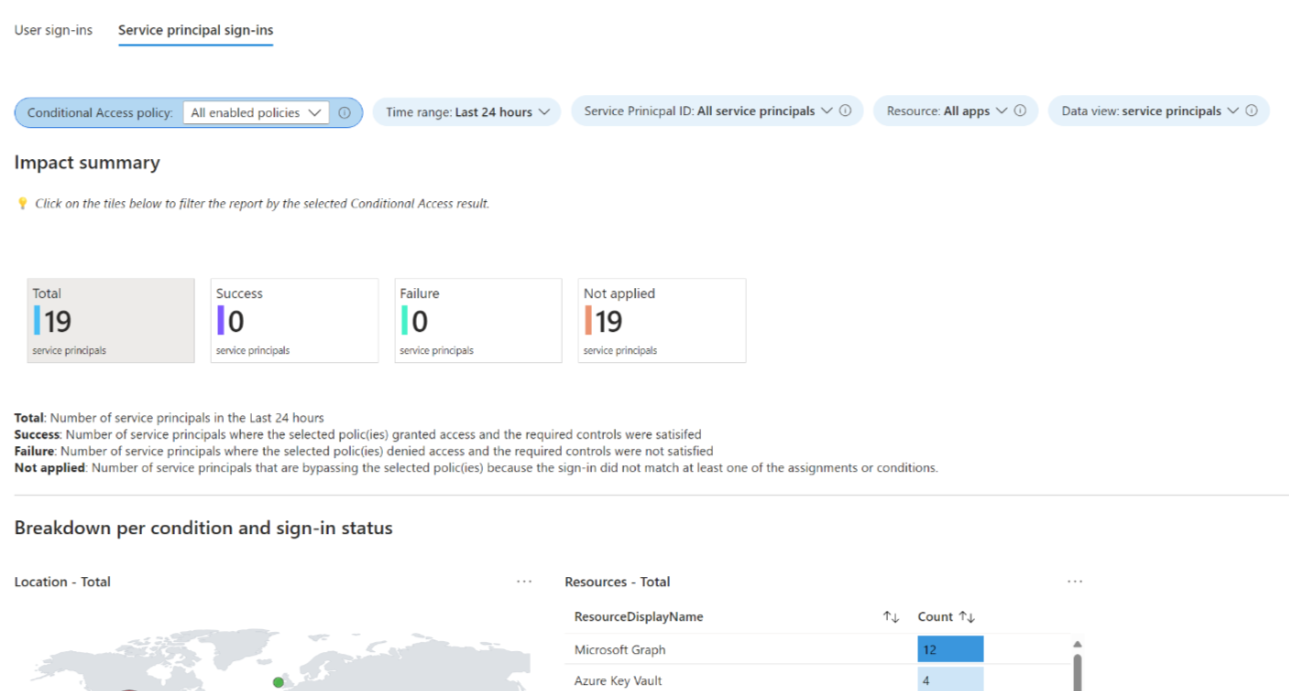
The Insights and Reporting capabilities provide a comprehensive view of your workload identity ecosystem, enabling you to:
- Monitor Conditional Access policies targeting workload identities
- Track identity health and risk signals
- Identify remediation opportunities
- Maintain audit compliance with detailed reporting
Licensing & Scalability
Microsoft Entra Workload ID Premium is a standalone SKU priced at $3 per workload identity per month. Here’s what’s important to know:
- ✅ No per-identity assignment required — One license in your tenant unlocks all premium features for all workload identities
- ✅ 90-day free trial available to get started
- ✅ Scalable pricing — Perfect for organizations with small to large numbers of workloads
Real-World Example
Organizations with typical service principals requiring licenses:
- 2 Custom Application Service Principals
- 0 First-Party Microsoft Application Service Principals
- 0 Managed Identities
- Total: 2 licenses needed ($6/month for unlimited premium features across the entire tenant)
Key Scenarios & Use Cases
1. Secure CI/CD Pipelines
Enable developers to use workload identity federation with GitHub Actions, allowing secure deployment to Azure App Service without managing long-lived secrets.
2. Microservices Architecture
Protect service-to-service communication by assigning unique workload identities to each microservice with granular access controls via Conditional Access policies.
3. Container Orchestration
Use managed identities to enable containers running on Kubernetes to access Azure resources (Key Vault, Storage, etc.) without credential injection.
4. AI Agent Security
Microsoft Entra Agent ID provides purpose-built identity constructs for autonomous AI systems with enforced human sponsorship and lifecycle governance.
5. Privileged Access Management
Review and monitor service principals assigned to privileged directory roles, ensuring compliance with least-privilege principles.
The Security Advantage
Microsoft Entra Workload ID helps organizations:
✔️ Eliminate credential sprawl — Remove the need to manage and store multiple secrets
✔️ Enforce adaptive security — Apply real-time Conditional Access policies to workloads
✔️ Detect threats early — Use Identity Protection to identify compromised identities
✔️ Simplify governance — Automated lifecycle management from provisioning to deactivation
✔️ Maintain compliance — Complete audit trails and access reviews for regulatory requirements
Getting Started
To begin securing your workload identities:
- Enable Managed Identities for Azure resources — eliminates credential management immediately
- Implement Workload Identity Federation for non-Azure workloads (GitHub Actions, Kubernetes, etc.)
- Apply Conditional Access policies to sensitive service principals
- Review privileged roles via access reviews for service principals
- Monitor with Identity Protection to detect and respond to risk signals
For detailed guidance, visit the Microsoft Entra Workload ID documentation.
Conclusion: Building a Zero-Trust Workload Security Model
Workload Identities represent a fundamental shift in how organizations secure service-to-service communication. By combining robust identity management, granular access control, and proactive threat detection, you can transition from reactive security measures to a proactive, identity-centric defense strategy. In a world where adversaries increasingly target non-human identities, Microsoft Entra Workload ID is your organization’s answer to securing the future of cloud applications.
Learn More:
- Microsoft Entra Workload ID Documentation
- Workload Identity Federation Guide
- Workload Identity FAQs
- Microsoft Entra Agent ID for AI Security
- Identity Protection for Workload Identities